
DDR4 RAM Compatibility Check: Will This Stick Work in My Motherboard or Laptop? (The 5-Minute Method)
In this guide
“how to check if ram is compatible with motherboard” is the question people ask after finding a good price and before losing money — which makes it the best-ordered question in the whole RAM space. In a market where a wrong buy means reselling into the same hostile prices you tried to escape, the five-minute check is the cheapest insurance available [source]. Here is the method, gate by gate.
Gate 1: The DDR generation (the physical law)
DDR generations do not interchange — the notch position (keying), pinout and voltage all differ. DDR3, DDR4 and DDR5 sticks will not seat in each other’s slots; forcing one is how slots die. The forum’s blunt version, written to someone hoping to dodge the work: “Gotta see which DDR version are those RAMS, ie DDR3/4 not compatible with DDR5 mobo whether use laptop or desktop RAM.” (agvx-ram-0324, Lowyat, Sep 28 2026).
How to know your generation without opening the case: CPU-Z → Memory tab reports it directly on the machine you are upgrading; for a board you are building on, the motherboard spec page states it (or the model name encodes it — most B550/Z590/B660-class boards are DDR4, most X670/B650/Z790-refresh boards are DDR5; a handful of Intel 600/700-series boards shipped in both variants, so read the exact model suffix).
Gate 2: Form factor — DIMM vs SODIMM
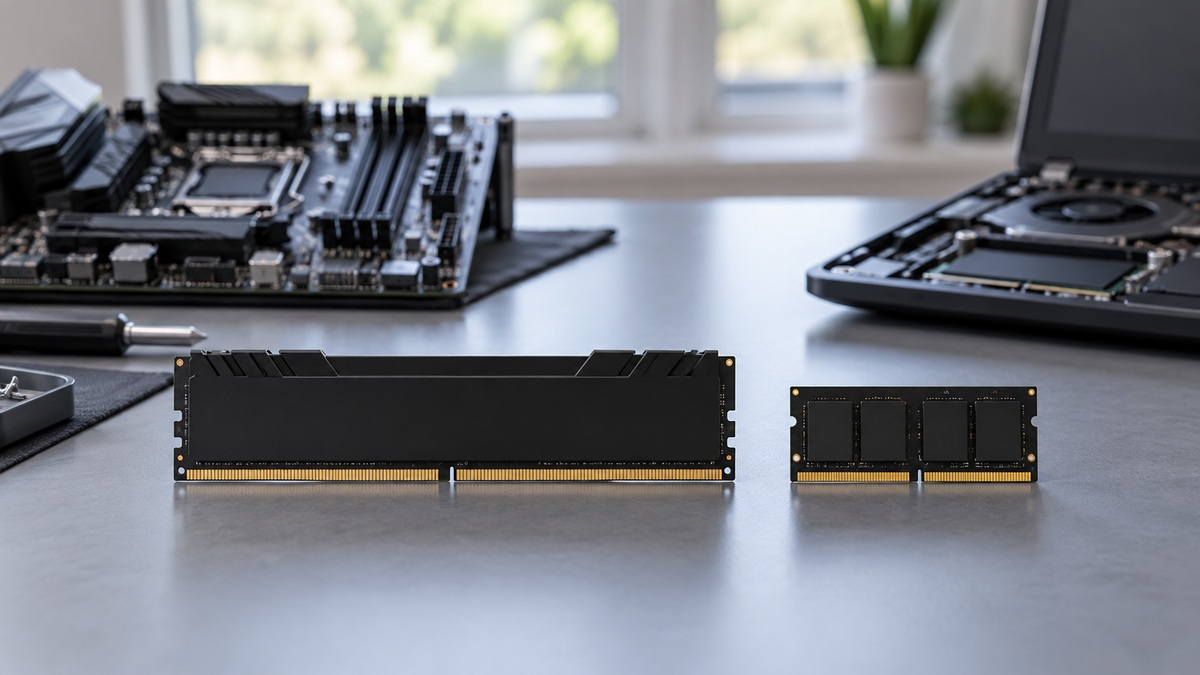
Desktop boards take full-size DIMMs; laptops, mini-PCs and some NUC-class machines take the smaller SODIMM. They do not adapt to each other in any way you want to own — the adaptor dongles that circulated on YouTube got a Lowyat eye-roll for good reason: “Why put laptop RAM on desktop mobo? You plan to use those adaptors that was hot on youtube for a moment? FYI lappie RAMS also went up in pricing, so the benefits got wasted and doing that you introduce another point of instability” (agvx-ram-0322, Lowyat, Sep 27 2026).
Gate 3: The QVL — the board maker’s tested list
Every motherboard vendor publishes a Qualified Vendor List: kits actually booted and validated on that exact board. It is a strong hint, not a closed law — unlisted kits work constantly — but when a kit IS listed, compatibility risk drops to near zero. In this market, that certainty is worth paying a small premium for: the DR-relayed used bands show spread within classes [source], and paying a little extra to eliminate a return-cycle is the best money in the purchase.
The CPU side of the same gate: the memory controller (IMC) lives in the processor, and kits above standard speeds depend on its quality. A Lowyat tuner’s summary of where the guarantees end: “3200mhz is piece of cake. Even for a locked CPU. 3600mhz onwards might cause some problems. It may need you to increase SOC voltage (AMD) or VCCSA/VCCIO/VDDQ TX (Intel). Depends on memory controller quality.” (agvx-ram-0248, Lowyat, Nov 20 2025).
Gate 4: XMP vs JEDEC — the OEM trap
A stick’s rated speed is a promise the motherboard must keep via XMP/DOCP/EXPO. Retail boards do. Many OEM machines — Dell, HP, Lenovo business lines, and most laptops — run JEDEC standard speeds only and ignore the rating entirely. The trap in one Lowyat sentence: “run at JEDEC as Dell does not support XMP” (agvx-ram-0232, Lowyat, Nov 4 2025). If your machine is OEM, buy the cheapest reputable stick and skip speed premiums altogether — the 3200-vs-3600 page explains why the question is moot there.
Gate 5: Mixing — what actually happens
- Different speeds/timings: everything runs at the slowest stick’s settings. Harmless, slightly wasteful.
- Different capacities: flex mode — the matched portion runs dual channel, the excess single channel. Works fine.
- Four sticks: possible, common, and the one configuration that leans on the IMC — the tuning thread on 32GB configurations says it directly: four sticks or 16GB-class dual-rank sticks “lean heavy on CPU IMC” — his fix being a lower RAM bus speed or looser timings (agvx-ram-0243, Lowyat, Nov 20 2025). Counterpoint from someone running it: “Running currently running 4x16 gb at 3600mhz cl16(XMP) with an i5-13500 on a B760 board. Same set of mushkin ram(2x16) bought on different dates. Everything stable” (agvx-ram-0482, reddit r/buildapc, 2026-01-07). Both are true; the difference is testing.
The 2026 twist: compatibility now includes the market
One more check that did not used to exist: what does this board’s generation cost to feed, today? The DDR4/DDR5 fork is a compatibility question with a price tag on it — and the market inverted the old logic, as a builder put it: “Pick the board you go with based on the DDR5 you get. It used to be you’d pick the RAM to get based off the motherboard you’ll pick, it’s the other way now.” (agvx-ram-0091, reddit r/buildapc, 2026-08-26). If your board is DDR4, the used market is your supply; if you are choosing platforms fresh, the DDR4 vs DDR5 page is the decision.
And when the compatibility check passes, one last free check before money moves: CPU-Z SPD tab against the physical stick — serial consistency, sane dates. It is the same two minutes that catches clone RAM: “CPUZ easily reveals the pirated details. The manufacturing dates and SAME serial number is the key to identify it.” (agvx-ram-0187, Lowyat forum).
Where to buy used RAM in 2026: Lowyat garage sales, Shopee used, or shops
The Malaysian used-RAM market runs through three doors. Full-service shops — a complete quote with a one-stop warranty, and you pay the shop gap for it. The Lowyat garage-sales thread and PC-building Facebook groups — community prices closest to the real market, and the verification work lands on your own shoulders. Shopee used and Carousell — the widest selection; the listing photos and the return window are your evidence. New DDR4 stock is concentrating in shops, so the used market is the real arena — and its unit of account is ringgit per gigabyte, not a kit’s face price.
Before you pay at any door, ask for these five things:
- Ringgit-per-gigabyte math first — a “cheap” feeling at one capacity cannot be compared straight against a differently-sized kit without the same unit.
- A photo of the actual sticks with the label close up — the label must match the model in the listing title: big-brand RAM is the most counterfeited, and the model number on the label is your spec match.
- A test promise or a return window — RAM faults are often intermittent and invisible in photos; ask for a memtest promise or a written return period.
- A meeting point and a receipt for face-to-face deals — a platform account is not a guarantee of the seller’s identity.
- A matched kit versus mixed sticks — pairs sold and tested together are safer; mixed singles sometimes drop speed.
Send in the spec you are looking at — WhatsApp us — answered by a human in working hours. The capacity-by-capacity price map lives at harga RAM DDR4; the shop-versus-DIY math at Lowyat versus building it yourself; the full buying guide with the counterfeit check at DDR4 buying guide.
Compatibility rules above are stable public spec knowledge. Market references are dated observations (2025-2026). No forecasts.
Frequently asked questions
How do I check if RAM is compatible with my motherboard?
Four gates, in order: DDR generation (DDR4 board takes DDR4 only — never DDR3 or DDR5), form factor (desktop DIMM vs laptop SODIMM), the board's QVL (the vendor's tested-kit list, a strong hint not a law), and your CPU's memory controller for anything above standard speeds. Free tools: CPU-Z (SPD/Memory tabs show what is installed now) and the motherboard model printed on the board or in Windows system info.
Can I put faster RAM in a slower motherboard?
Yes — a 3600 stick in a 3200-capable system simply runs at the system's limit (or the stick's JEDEC fallback). You waste the premium but break nothing. The reverse (slow board forcing fast stick down) is the same event seen from the other side. Never pay for speed your platform cannot clock. [source]
Does XMP work on every DDR4 machine?
No — and this catches OEM buyers specifically. Dell, HP, Lenovo business machines and most laptops often ignore XMP and run JEDEC standard speeds (2133/2400/2666) regardless of the stick's rating. A Lowyat Dell owner plans around exactly this: 'run at JEDEC as Dell does not support XMP.' Check before paying a speed premium. [source]
Can I mix RAM brands, speeds and capacities?
Physically yes if the generation and form factor match. The system runs all sticks at the slowest stick's speed and timings; mixed capacities run flex mode (matched portion dual channel). Stability with four mixed sticks is testable, not guaranteed. For anything performance-sensitive, matched kits remain the sane buy.
Do I need to check compatibility for laptop RAM too?
Yes, and one more gate: some laptops have soldered memory with no slot at all. Confirm a free SODIMM slot exists (spec sheet, teardown video, or the Crucial/Kingston configurator tools by model), confirm DDR4 not DDR3/DDR5, then buy the SODIMM class. SODIMM and desktop DIMM never interchange.